RisingOS 8.1.1 (Android 16) for Samsung Galaxy S20 FE 5G – Complete Guide

Android phones are popular because they give users freedom and control. Over time, many users feel that the stock system becomes slow or limited. This is where custom ROMs become useful. RisingOS is one such custom ROM that brings a clean and modern Android experience to supported devices.
For users of the Samsung Galaxy S20 FE 5G, RisingOS 8.1.1 offers a chance to enjoy Android 16 with fewer system apps and better performance. This ROM is specially built for the Snapdragon variant of the device and focuses on simplicity, speed, and stability.
In this article, we will explain RisingOS in simple words so that even new users can understand it easily. You will learn what RisingOS is, how it works, why it is useful, and which devices are supported. This guide is written to help users make the right decision before installing a custom ROM.
What Is RisingOS and How It Works
RisingOS is a custom Android operating system based on the Android Open Source Project, also known as AOSP. This means it uses Google’s open Android code as its base and then improves it by removing unnecessary parts and adding useful features.
Unlike stock Samsung firmware, RisingOS does not come with heavy skins or extra apps. It focuses on keeping the system clean and light. Because of this, the phone can use its hardware more efficiently.
RisingOS works by replacing the original system software on your phone. Once installed, it controls how your device looks and behaves. Apps run on top of RisingOS just like they do on any other Android system. The difference is that RisingOS uses fewer background services, which helps improve speed and battery life.
This ROM is built for users who want:
- A clean Android interface
- Better control over system behavior
- Faster performance
- Fewer pre-installed apps
RisingOS is not meant to change Android completely. Instead, it improves the existing Android experience by keeping things simple and smooth.
Why RisingOS Is a Good Choice for S20 FE 5G Users
The Samsung Galaxy S20 FE 5G is a powerful phone with strong hardware. However, as time passes, official updates become slower and sometimes stop completely. RisingOS helps users keep their device up to date.
One big reason to choose RisingOS is that it offers a newer Android version compared to stock firmware. With RisingOS 8.1.1, users can enjoy Android 16 features on their S20 FE 5G.
Another reason is performance. Samsung’s OneUI includes many built-in apps and services that not every user needs. RisingOS removes most of these extras, which helps the phone run faster and smoother.
RisingOS is also a good choice for users who prefer:
- A near-stock Android look
- Less visual clutter
- Simple system settings
- Better control over apps and permissions
For users who like experimenting with their device and want more freedom, RisingOS is a reliable option.
RisingOS 8.1.1 and Android 16 Overview
RisingOS 8.1.1 is based on Android 16, which brings several improvements over older Android versions. This combination gives users a modern system with better performance and security.
Here is a quick overview of RisingOS 8.1.1 for the Samsung Galaxy S20 FE 5G:
- ROM Name: RisingOS
- ROM Version: 8.1.1
- Android Version: Android 16
- Build Type: User
- Google Apps: Minimal Google Framework
- Device: Samsung Galaxy S20 FE 5G
- Model: SM-G7810 (Snapdragon)
Android 16 focuses on smoother animations, better background app control, and improved privacy options. When combined with RisingOS, the system feels faster and more responsive.
RisingOS 8.1.1 also includes small but important changes like improved system stability, updated sources, and better UI behavior. These improvements help create a balanced system that works well for daily use.
Supported and Unsupported Device Models
Before installing any custom ROM, checking device compatibility is extremely important. Installing a ROM on the wrong model can cause serious problems.
Supported Device
RisingOS 8.1.1 officially supports:
-
Samsung Galaxy S20 FE 5G (SM-G7810 – Snapdragon variant)
This build is made specifically for the Snapdragon processor and works properly only on this model.
Unsupported Devices
The following device is not supported:
- Samsung Galaxy S20 FE Exynos variant (SM-G780F)
The Exynos version uses different hardware, which makes it incompatible with this ROM. Users with the Exynos model should not try to install RisingOS 8.1.1.
Always check your phone’s model number before flashing. This simple step can help you avoid serious issues like boot loops or device damage.
New Features and October Update Details
RisingOS 8.1.1 comes with several useful updates that improve both performance and user experience. The October update focuses on system stability, visual improvements, and better device handling for the Samsung Galaxy S20 FE 5G.
One of the main changes is that the ROM is synced with the latest RisingOS 8.1.1 source code. This means many small bugs are fixed, and the system works more smoothly. The developer also changed the default wallpaper that appears on the first boot, giving the phone a fresh and modern look.
Another important update is related to device information. The system now correctly shows Samsung Galaxy S20 FE 5G in the “About Phone” section. The default model is fixed to SM-G7810, which helps avoid confusion for users.
Visual improvements are also included. Global blur effects are enabled, which makes menus and backgrounds look smoother and more modern. The Lawnchair launcher is enabled by default, offering a clean and simple home screen experience.
The Google services included in this ROM are kept to a minimum. This helps reduce system load and improves battery life. The developer has also mentioned that regular updates will be provided in the future with more fixes and improvements.
Performance, Battery Life, and User Experience
Performance is one of the strongest points of RisingOS. Because the ROM removes unnecessary system apps and services, the phone can use its hardware more efficiently.
Most users notice that apps open faster and multitasking feels smoother. There is less lag when switching between apps, and the overall system feels lighter compared to stock OneUI. RAM management is also improved, which helps keep apps running in the background without frequent reloads.
Battery life is another area where RisingOS performs well. Since fewer background processes are running, the phone consumes less power during standby and normal use. While battery performance always depends on usage habits, many users report better results than the stock firmware.
User experience is clean and simple. The interface is easy to understand, even for users who are new to custom ROMs. System animations are smooth, and the overall look feels modern without being too flashy. RisingOS is well-suited for daily use, including calls, messaging, browsing, and media consumption.
Things to Know Before Installing RisingOS
Before installing RisingOS, it is very important to understand a few key points. Custom ROM flashing is not difficult, but it does require care and attention.
First, flashing a custom ROM may void your device warranty. This is common for most custom firmware. Second, there is always a risk of data loss during the flashing process. This is why creating a full backup is strongly recommended.
You should also make sure that your phone model is fully supported. Installing the ROM on an unsupported device can lead to boot loops or other serious problems. Always read the installation steps carefully and follow them in order.
This ROM is best for users who:
- Understand basic flashing steps
- Are comfortable using a PC
- Can follow instructions carefully
If you are new to custom ROMs, take your time and read the full guide before starting.
Step-by-Step Installation and Flashing Guide
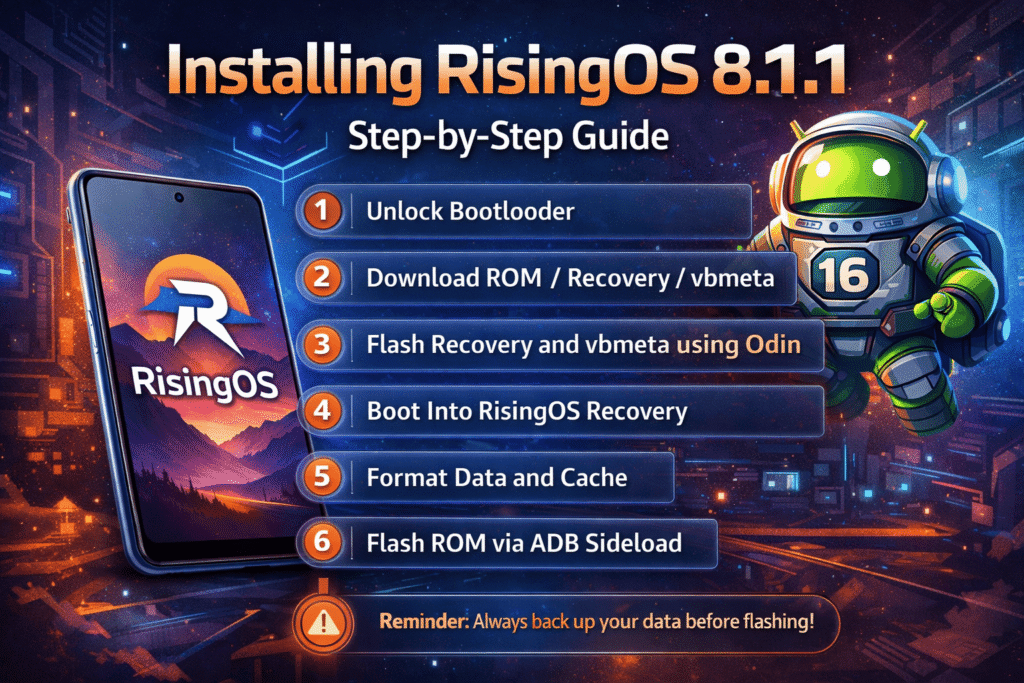
Installing RisingOS 8.1.1 requires a few tools and some patience. Below is a simplified step-by-step guide to help users understand the process.
First, make sure your device bootloader is unlocked. This step is required to install any custom ROM. Unlocking the bootloader may erase your data, so back up everything first.
Next, download the required files. These include the RisingOS ROM file, recovery file, and vbmeta file. All files should be downloaded to your computer.
Use Odin to flash the recovery and vbmeta files. Open Odin on your PC, place the recovery file in the AP section and vbmeta in the USERDATA section. Then connect your phone in Download Mode and start the flashing process.
After flashing, boot into RisingOS Recovery mode using the hardware buttons. Inside recovery, perform a factory reset, format data, and clear cache. This ensures a clean installation.
Finally, use ADB sideload to flash the ROM ZIP file from your computer. Once the process is complete, reboot the system. The first boot may take several minutes, which is normal.
Download Links
Please note that the files are hosted on third-party servers. We do not host any ROM files on our website.
-
ROM File:
https://www.123684.com/s/OnCEvd-1mqsH?pwd=PWap
Code: PWap -
Recovery File:
https://www.123684.com/s/OnCEvd-4mqsH?pwd=m45d
Code: m45d -
VBMeta File:
https://www.123684.com/s/OnCEvd-xmqsH?pwd=IsrC
Code: IsrC
Credits
Special thanks to the developers and contributors who made this ROM possible:
- @ata-kaner – Device tree and kernel source
- @TheMuppets – Open-source vendor support
- @Runds – Help with black screen boot issue
Their work helps keep the Android custom ROM community alive.
FAQs:
Is RisingOS safe for daily use?
Yes, if installed correctly on the supported device, it is suitable for daily use.
Does this ROM support Exynos models?
No, it is only for the Snapdragon SM-G7810 variant.
Are Google apps included?
Yes, a minimal Google Framework is included.
Will future updates be available?
Yes, the developer plans to provide regular updates.
Final Thoughts
RisingOS 8.1.1 brings a clean, fast, and modern Android 16 experience to the Samsung Galaxy S20 FE 5G. It removes unnecessary system apps, improves performance, and offers a simple user interface that is easy to use.
If you want better speed, improved battery life, and a fresh Android feel, RisingOS is a strong choice. Just make sure to follow the instructions carefully and install it only on the supported device model.